
“How do I reconnect a mailbox to another user?” is a question I’ve come across enough number of times that it makes sense to list the steps here and include a video demo.
Scenario: UserA has a mailbox. User leaves the organization. UserB joins. You need to create a new user account for UserB, and have it connect to UserA’s mailbox. (Or any situation similar to this where you want mailbox from one user to be assigned to another user. This is different from providing UserB the ability to open UserA’s mailbox as an additional mailbox – which simply requires Full Access permission to UserA’s mailbox.)
 Delete the user’s mailbox from AD Users & Computers. Right-click the user account | Exchange Tasks | Delete Mailbox. Don’t worry about the mailbox data – we’re not really deleting the mailbox, just disconnecting it from UserA.
 Run the cleanup agent in Exchange System Manager. Expand the Store where the mailbox resides | right-click Mailboxes | click Run cleanup agent.
This marks all disconnected/orphaned mailboxes with a red cross icon superimposed, as shown in the screenshot below.
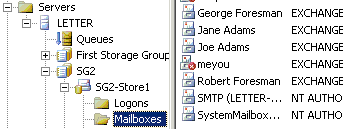
 Now you can reconnect the disconnected mailbox to another user account that isn’t (already) mailbox-enabled.
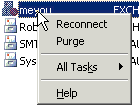
- Right-click the disconnected mailbox | click Reconnect.
- Type in the name of the user you want to reconnect it to, or click Find and look for the user.
Video: Reconnect a mailbox to another user
More about disconnected mailboxes
Q. What happens to the disconnected mailboxes if they’re not reconnected?
A. The mailbox clean-up agent runs and marks a mailbox as disconnected/deleted.
By default, Exchange mailbox databases (MDBs) are configured to retain deleted mailboxes till 30 days. This makes it easy to recover any mailboxes disconnected or deleted accidentally. If deleted mailbox retention is disabled, the mailbox is purged from the database.
An exception to this rule – if the MDB is configured to not purge deleted mailboxes till the store is backed up, the mailbox lives beyond the retention period, until a backup is completed successfully.
Ok… I accidently disconnected a Mailbox from the associated user, then was unable to reconnect. I could not find the MBX files anywhere, and no one could send e-mail to the user in question. The user still appeared in Exchange System Manager, but the mailbox had the RED-X it. I tried to reconnect to the user, but it would not allow me to do that. Another of my associates deleted the account through Active Directory, and re-added it. The user can now recieve and send e-mail, but all of the previous e-mail information is gone. How do I reconnect the old info with the newly created account? I tried to do the Reconnect but it won’t allow it saying the “specified value is used by xxxx.xxxx”.
If the mailbox has a red X on it as you said, it is an orphaned mailbox. The deletion of the associated AD user account caused it to be orphaned. Your associate recreated the account, and in the process also created another mailbox.
Now the new user account already has a mailbox – so you can’t reconnect the orphaned mailbox to it.
If the new mailbox doesn’t have any mail in it, you could delete the mailbox (AD Users & Computers | right-click user | Exchange Tasks) and reconnect the old mailbox to that user.
Alternatively, you could create a new user account and not mailbox-enable it during account setup. Then connect the orphaned mailbox in ESM to the new user account, and either extract mail to a PST (can use ExMerge for this).
Bharat: I came across this post while having some odd difficulty reconnecting a mailbox with a user account.
Interesting problem behind the story is that I am trying to fix an odd permissions issue on this user’s mail store. Essentially, he is the only user in my organization whose Inbox, Calendar, Contacts, and other folders can be opened by any user in the organization. I have no answer as to why this is the case, and I thought possibly wiping Exchange attributes would resolve this, but to no avail. I even blogged about this issue.
Any ideas as to why this mailbox has a strange rights problem? I realize I am putting you on the spot, but I am plum out of ideas. Nice blog, though. Keep up the good work.
Have you checked permissions on the mailbox? (user properties | Exchange Advanced | Mailbox rights – check what’s different compared to another mailbox – who has full mailbox access, Send As & Receive As rights. What rights are assigned to Authenticated Users, Everyone and ANONYMOUS LOGON?).
Alternatively, try creating a new mailbox for the user.
I actually wound up calling PSS, and the problem was an inadvertent “Full Mailbox Access” ACL for all Mailbox Operators. Once we removed that, the problem resolved itself.
We almost went the ExMerge route, but fortunately, we did not need to do that.
Thank you for the article! One small question – if I delete mailbox and don’t run “Run cleanup agent” how soon mailbox will be marked with a red cross icon?
The Deleted Mailbox Cleanup subtask runs as part of Store maintenance – by default this is set to run between 2:00 – 6:00 a.m. daily. This can be changed from a Store’s properties | Database page.
When I try to reconnect the mailbox to a different user the ESM just locks up, is this normal, does it just take awhile to proccess or am I having issues?
Hi,
In exchange 2003 I want to change message delay notification from 1 hour to 15 min, can i do that? how? Currently user’s message sits in the queue for 1 hour, that is when they get an automated notification. I need to change that to 15. Thanks heaps
I had trouble reconnecting a disconnected mailbox to a new user. First, I had to delete the new users mailbox (nearly empty) and then I could connect the old mailbox. However, I then got a ‘permission denied’ error when I tried to access the email via Outlook.
For anyone else with the same problem, I fixed it by checking in the ‘Exchange Advanced’ tab for that user under ‘Mailbox Rights’ and then ‘Advanced’ and then ‘Owner’ and setting the ownership to the ‘Administrators’ group of which the new member was a member of. ( Previously, my personal network admin acccount was the owner as I created the user account.)
That worked.
Hope it helps someone else. Thanks for the info
This is great, I was not aware that the user needed to be Echange free in order to reconnect. Thanks !!!!
Hi Bharat, in a practice session, i am facing one issue which i not able to rectify. There are 2 different domains with different exchange on 2 different class ip’s. i connected them with routing and remote and keep the trust in between them. Now server A able to send there mails to server B but the server B’s mail are stuck in there quee. is there issue with connector? or in DNS records? can you please help me out in the same..
Ulhas
Hi Bharat, Thank you for some very helpful information. However, just wanted to mention, that the link to your flash demo for Mailbox reconnect, does not work. The correct link should be – http://www.exchangepedia.com/blog/demos/Exch2003-ReconnectMailbox.htm
thanks
Atul
Thanks Atul, the link has been corrected. (BTW, there’s no www in the URL any more, though it still may work… ).
Interesting variety on the problem here,
I have moved a user from one OU to another, before the move they were associated with a mailbox and had all Exchange tabs, after the move the assocation to the mailbox had stopped, all Exchange tabs are gone from the user and when you right click and use Exchange Tasks there is no ‘delete mailbox’ option, only a ‘create mailbox’ or ‘remove all exchange assocations’,
Now the warnings you get up for the ‘remove’ are looking pretty serious so I haven’t tried that, tried the update option in System manager and the mailbox is still there and isn’t orphaned,
Any suggestions on how I get the mailbox to re-associate/get it to associate with a new version of the same users account?
You saved me hours of work. Thank you so much for this post.
I have an issue where a user A’s account was deleted and recreated as ‘A1’. And a new mailbox was created along with it.
All the x400,smtp,ms,ccmail entries from old account have been moved to the new account.
The exchange attributes were removed from the old account and is currently showing with a red cross in exchange manager.
The issue I am having is that the users who have her old email address in the autocomplete history are getting bounced back message that the recipient mailbox does not exist.
I would have thought that moving the x400 records to this new account would hav esolved this problem. Am I correct in saying this?
Any help on this will be appreciated.
go to one of the previous messages user A sent and look at the properties for user A in the TO: line when you hit reply. If the name is resolving properly you should see the user information from the GAL. If it isn’t resolving properly, you will see an x500 address in the display line. Add this x500 address as a custom address type for user A1 and that should fix the problem.
I see regularly in the event viewer this WARNING (1025 ) MSExchangeIS Mailbox Store
An error occurred on database “First Storage Group\User”.
Function name or description of problem: EcGenerateNRN:
Error: 0x80070005
Can someone help my please to solve this?
Thanks in advance,
Hello Bharat, I need urgent help. I’ve got a user whose mailbox is corrupted (Exchange 2000).
I created a pst and ask the user to save the most important items.
I want to delete current mailbox, recreate a brand new one and connect to the existing user account. Then reimport the items from the pst. What’s the procedure to recreate and reconnect a mailbox? Thank you!
Sandra
Hi Bharat,
Someone deleted a mailbox, i created it again in her AD account, now the lady doesnt get her old emails, have i overwritten the old mail box and lost them all for good or is there a way round???
This is a very useful post. Thank you for writing it.
I have a situation in which I need to disconnect several user from their mailboxes, but I don’t have access to the users’ properties in ADUC due to a DC failure. I need to make new users in a different domain, but I’d like to be able to move their mailboxes like in your post.
Do you know how of another way to disconnect user from its mailbox?
This worked perfectly. Thanks for the post. I had a user whose TS account got messed up and even recreating it wouldn’t fix the issue. I needed to create a new user account, but wanted to keep the mailbox. This is a really simple scenario (even though the delete does sound risky).
thanks for the quick refresher Bharat.
cheers.
il
Checkout the knowledge base article from Microsoft: http://support.microsoft.com/kb/274343
I don't know if this applies to my situation-
I have a new user-JoeSmith.
I created an AD account and mail enabled it. When he opens his Outlook he sends and receives email as [email protected]
He needs to send & recieve email as [email protected] as well.
How can I set up Joe to send & recieve as the Engineer?
Thanks for your help.
I have no answer as to why this is the case, and I thought possibly wiping Exchange attributes would resolve this, but to no avail. I even blogged about this issue.
Moving the mail box works with out a problem, thanks Bharat. No issues
Chancuco
Thanks this solution saved me a whole lot of heartache
many thanks
Neil
Would this problem solve this issue outlined below?
Two days ago ourcompany’s old marketing manager left and her account was deleted by another administrator using ‘AD Users and Computers’. Her replacement has joined the company. Although it is OK to create a new account for this new user we need her to use the old marketing managers Exchange mailbox. What is the easiest way to achieve this so the mailbox has all the addresses and email it had before?
If the ex-employee’s user account was deleted, you won’t have all its email addresses. If you know them, you can simply add them to the new user manually.
To provide access to ex-employee’s email, you can use any of the following methods:
[…] Originally Posted by sixto New HD, fresh XP and Office 2007 installation, Outlook still hangs. I can fix a 603.97. This? Sheesh! Sixto 87 300D^2 If this is the case the problem is probably with your Windows account, or your Exchange permissions. Make sure your account actually has Exchange permissions. This is done in Active Directory. If it does have the appropriate permissions, then the account itself is hosed. Delete the account and re-create it. See the following http://exchangepedia.com/2006/03/how-to-reconnect-a-mailbox-to-another-user.html […]
Hi Bharat,
Thanks for sharing this helpful post. When a mailbox is deleted, it gets move into dumpster from where it can be restored within the retention period. However, once retention period expired, user can not restore it.
To restore a permanently deleted mailbox, user need to use either most recent backup or a third party tool like this: http://www.serversdatarecovery.com/exchange.html
These tools are designed with powerful scanning algorithm to scan the database deeply and recover all lost items.
thanks
Albert
I moved a mailbox from one user to the other but all associated emails were removed. Is there any way to get the account back? I didnt make a note of them prior to the move.
Thank you,
BD
This is great. You saved my day with this article.
Thank you so much
Greattttt!!!
cheers helped me out
Hi, I ran into a weird issue and was hoping maybe you could help me with it.
I had a task to migrate a bunch of mailboxes from user accounts in one OU to user accounts in another OU within the same Active Directory site. I scripted it out and all worked great. Mailboxes were all migrated successfully. The issue I am getting now is that these users share their calendars with each other with full details, but many of the users are having issues seeing anything more than simple free/busy. I have tried re-sharing the calendar with the proper permission set, tried rebuilding profiles, nothing seems to help. Do you have any suggestions?