
In Exchange Server 2007 (and Exchange 2010), recipients are managed from the Exchange Management Console (EMC) or Exchange Management Shell (aka the Shell). EMC does not have a Security tab for recipients.
You can still use Active Directory Users & Computers (ADUC) console to modify permissions on a recipient, as the documentation suggests [“How to Grant Send As Permissions for a Mailbox“] – and in this case, assign the Send As permission. Select the recipient in ADUC > select Properties > select the Security tab.
You can also use the Exchange Shell to quickly assign the SendAs right (for example, on a Distribution Group) to a user:
Add-AdPermission “Group Name” -user “User Name” -AccessRights
extendedright -ExtendedRights “send as”
Documentation for Add-ADPermission Exchange 2007 | Exchange 2010

11/29/2007:
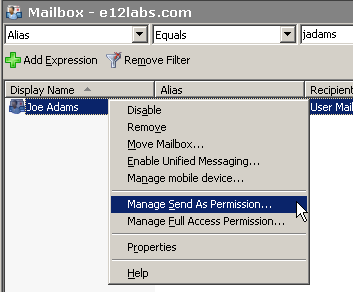
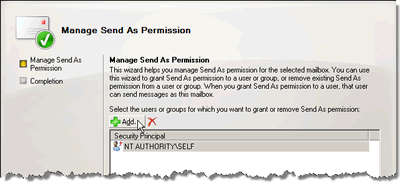
Exchange Server 2007 SP1 includes a Manage Send As Permissions wizard, similar to the Full Mailbox Access wizard found in the RTM version.
-
In EMC, right-click the recipient for which you want to manage Send As permission > select Manage Send As Permission
-
In the Manage Send As Permission wizard, click the Add button to add the user that you want to assign the Send As permission to.
THis command worked great for me, thanks! I am, however, having difficulty piping users with this command… I.E… Get-user -organizationalunit NAMEOFOU | add-adpermission ….etc. It returns an error saying the command is not able to be pipelined. Do you know the correct usage of this command?
I had the same problem, I don’t want to do one at a time, I want to add the sendas permission on a large group of users, I tried the get-user and then pipe add-adpermission but got an error
You need to do a Get-Mailbox instead of Get-User. You can constrain that based on -OrganizationalUnit or -Server parameters.
Alternatively, you can do this for members of a Distribution Group – Get-DistributionGroupMember “Dist Group Name”
You can further constrain Dist Group members to a particular recipient type:
Get-DistributionGroupMember “DG Name” | where {$_.RecipientType -eq “UserMailbox”}
Pipe the above command to Add-ADPermission.
how to take back “send as” permisson on org. unit?
[…] Bharat Suneja on June 28, 2007 Follow-up to previous post “HOW TO: Assign SendAs right using Exchange shell” – the ability to assign SendAs and ReceiveAs permissions is preserved in Active […]
[…] – HOW TO: Assign SendAs right using Exchange shell […]
I had created a distribution group as requested by our Project Management group. Later they changed it with a request to be able to “send as” from the people in the group. I had to change the group to universal, then change it from a distribution group to a security group. Then I had to go to an administrative powershell to run these commands to get it to work. Add-ADPermission “Project Management group” -user “tsmith” -accessrights extendedright -extendedrights “send as”