
In Exchange Server 2010 and Exchange 2007, you can apply Managed Folder Mailbox Policies to mailboxes to control message retention. Conceptually, this is somewhat similar to Recipient Policy with Mailbox Manager settings in Exchange Server 2003, which is commonly used by administrators to accomplish tasks like emptying users’ Deleted Items folders after a specified period like 90 or 180 days.
(Messaging Records Management is an interesting topic, and a good candidate for a more elaborate article in the near future explaining how it works – Bharat)
Just as Exchange 2003’s Mailbox Manager process runs on a schedule and applies the Mailbox Manager policies to mailboxes, Exchange 2007/2010’s Managed Folder Assistant (MFA) applies Managed Folder Policies. By default, it’s set to Never Run, as shown in the screen-shot below.
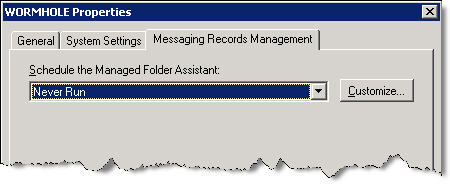
Figure 1: In Exchange 2007, the Managed Folder Assistant is set to ‘Never Run’ by default
If you’ve just gone through the entire process of creating Managed Folder Policies, and are wondering why the mailboxes are not getting processed and why messages older than the time period you specified aren’t getting purged, it’s most likely because you haven’t modified the MFA‘s default schedule and actually set a schedule for the assistant to run and process mailboxes.
You must create a MFA schedule for each Mailbox server that hosts mailboxes.
Scheduling the Managed Folder Assistant
To schedule the MFA using the EMC:
- Expand Server Configuration | Mailbox
- Slect the Mailbox server and then click Properties
- On the Messaging Records Management tab, click Customize
- On the Schedule page, select a time period.
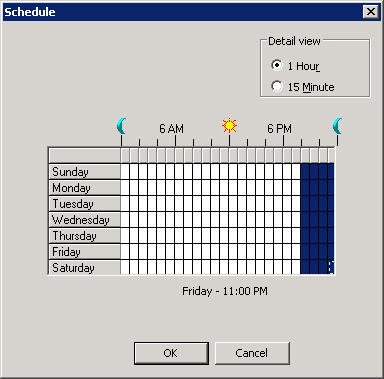
Figure 2: Select a schedule for the Managed Folder AssistantAlthough you can schedule the MFA to run once a week or on certain days of the week, you must consider your organization’s compliance policies when setting this schedule.
Update 6/27/2011: In Exchange 2010 RTM, the Managed Folder Assistant is configured with a default schedule. In Exchange 2010 SP1, the assistant is changed from being a time-based assistant to a throttle-based assistant, which means it’s always running and does not need to be scheduled. As the name implies, a throttle-based assistant is throttled as required to limit resource consumption on the Mailbox server.
Manually starting the Managed Folder Assistant
In addition to being able to schedule the MFA to run— preferably after-hours, just like you did with Exchange Server 2003’s Mailbox Manager – you can also trigger it manually from the shell, using the Start-ManagedFolderAssistant cmdlet (Exchange 2010 version here)..
The cmdlet triggers the agent to run immediately. You can specify which server(s) to start the agent on, by using the -Server SERVERNAME parameter:
Start-ManagedFolderAssistant -Server EXCHANGE1, EXCHANGE2
You can also specify which mailboxes to process by adding the -Mailbox “Mailbox Identity parameter (the identity of a user can be specified as an SMTP address, domain\username, or mailbox GUID), as described in the online docs:
Start-ManagedFolderAssistant -Mailbox [email protected]
Note: You can’t use both the -Server and -Mailbox parameters together.
Related posts:
– Managed Folders: How to apply different Managed Content Settings to Default Folders
– Applying Managed Folder Policy to more than one user
– Restricting Messaging Records Management to a particular message type
In exchange 2003 you can specify a mailbox in order to receive a report. Is this possible in Exchange 2007?
I’m trying to figure out the same thing. Can we get a report with the results from the Managed Folder process? Is this possible like in Exchange 2003?
No, the Managed Folder Assistant does not generate email reports to users or administrators.
However, it does log actions taken in the Messaging Records Management (MRM) log – it has all the information you need. MRM logging is not enabled by default.
Details:
– Exchange Server 2007: How many logs hath thee?
– How to Configure Messaging Records Management Logging
Is the agent running during the time that is WHITE or BLUE?
The log feature in 2007 is decent as it gives you a ton of info… BUT- having a SUMMARY log of the process that actually gets emailed to someone is yet another useful feature strangely omitted from Exchange 2007. The list of such things is growing as we explore this product.
I have created a policy and set schedule to remove all items from the Sync Issues folder after one day. But the folder never empties.
I am currently working a solution
We have to implement an MRM policy based on the following:
Inbox (90 Days)
Sent Items (30 Days)
Deleted Items (7 Days)
So far so good, Just need to send a nice report to all users.
Go live is 7 July 2011, so I should have a working solution in place before
For updates, please mail [email protected]
Regards,
Sean