
The Exchange console does not have pre-canned filter options for Country or City to be able to create a Dynamic Distribution Group (DDG, aka “Query-Based Distribution Group”) for all recipients or mailboxes in a particular country or city. You can use options to filter on Department, Company, State or Province, or the custom/extension attributes 1-15.
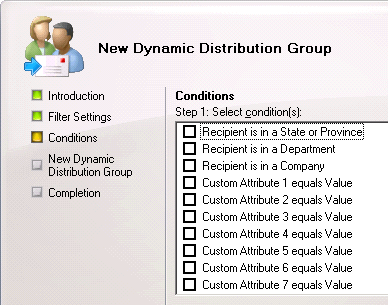
Fig. 1: You can filter on Department, Company, State or Province or extension attributes 1-15 using pre-canned filters
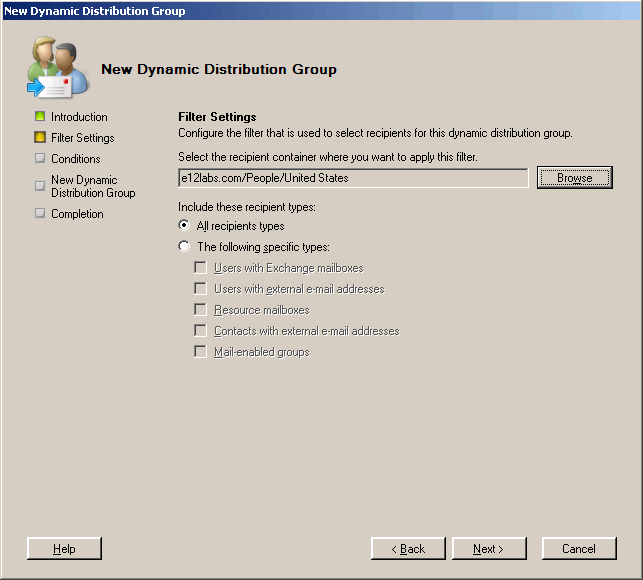
If your Active Directory OUs are structured based on location (country/state/city), you can simply scope the DDG to that OU using the Exchange console, as shown in the following screenshot.
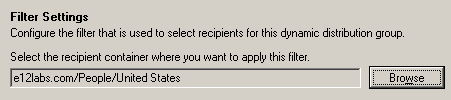
Fig. 2: You can set the scope of the DDG to a particular OU or container. Click here to see the complete dialog box.
However, if that’s not the case (e.g. OU structure is based on business units or departments, etc.), you will need to use the Exchange shell to create a DDG with a custom filter.
To create a DDG for all user mailboxes from a particular country:
New-DynamicDistributionGroup -Name “US-Users” -OrganizationalUnit “OUorContainerNameToCreateGroupIn” -RecipientContainer “yourdomain.com” -RecipientFilter {RecipientType -eq “UserMailbox” -and CountryOrRegion -eq “United States”}
You can change the RecipientType to include other types of recipients.
To view recipients/mailboxes returned by the RecipientFilter: “HOW TO: View membership of a Dynamic Distribution Group“.
Similarly, to create a DDG for all user mailboxes from a particular city:
New-DynamicDistributionGroup -Name “SF-Users” -OrganizationalUnit “OUorContainerNameToCreateGroupIn” -RecipientContainer “yourdomain.com” -RecipientFilter {RecipientType -eq “UserMailbox” -and City -eq “San Francisco”}
Is there anyway to secure access to who can send to these dynamic distribution groups?
– By default Dynamic Distribution Groups don’t accept mail from unauthenticated senders (i.e. internet senders)
– You can restrict who can send to these groups by:
1) Using the Exchange console -> group properties | Mail Flow Settings tab | Message Delivery Restrictions | select “Only senders in the following list” | click Add | add recipients.
2) Using the Exchange shell:
Set-DynamicDistributionGroup “MyDDG” -AcceptMessagesOnlyFrom “[email protected]”
Thanks for that makes perfect sense now I look at what was staring me in the face :)
I do not see my DDG’s in Outlook or OWA… We are on Exchange 2007 SP1.
Quote
“2) Using the Exchange shell:
Set-DynamicDistributionGroup “MyDDG” -AcceptMessagesOnlyFrom “[email protected]”
works great if acceptmessageonlyfrom is only [email protected].
Is there a way to populate more than one emailaddress ? Because i have 2 users who are allowed to use this MyDDG distribution list.
You can add multiple values:
Set-DynamicDistributionGroup “MyDDG” -AcceptMessagesOnlyFrom “[email protected]”,”[email protected]”,”[email protected]”
Next question (if I can anticipate correctly :) – How do I update this list? Do I have to type all the addresses again??
Here’s how multivalued properties can be updated:
HOW TO Update multi-valued attributes in PowerShell
I am having trouble getting this command to run rights. I am just wanting to grant a list of mailboxes rights send to a DL(s).
I get error saying this names are not valid in my csv file.
Import-csv c:\SOtest2.csv | ForEach-Object {Set-DistributionGroup -Identity $_.Identity -AcceptmessagesOnlyFrom $_.AcceptmessagesOnlyFrom}
@Matt: It’s hard to say without seeing sample row/data from your csv.
Also note, AcceptedMessagesOnlyFrom is a multivalued attribute (in case you’re trying to add different values in separate operations… ).
Look at another post about PowerShell and multivalued attributes:
HOW TO Update multi-valued attributes in PowerShell
Question here: I’m trying to create dynamic DL to filter/add 2 cities? Command I have: New-DynamicDistributionGroup -Name “Funeral Home Managers ON” -RecipientFilter {(RecipientType -eq ‘UserMailbox’) -and (Title -like ‘Manager*’) -and (StateOrProvince -eq ‘ON’) -or (City -eq ‘Toronto’, ‘Alberta’}. Basically, what im trying to achieve is, when users sends email to DynamicDL “Funeral Home Managers ON”, only managers from ON and City of Toronto and Alberta will be able to receive. Please advise.
Thank you for the script. However am having challenges with creating DL with multiple countries
Set-DynamicDistributionGroup -Identity “xxxxxxxx” -RecipientFilter {((RecipientType -eq ‘UserMailbox’) -and (CountryOrRegion -eq ‘xxxxx,xxxxx,xxxxx,xxxxx,xxxxxx,xxxxxx,xxxxxx’))}
Is that the correct syntax
@Terence: No, it’s not the correct syntax. You can’t provide multiple values as comma-separated values in a recipient filter to do a logical OR. Recipient filters use OPATH syntax. You’d need to use the OR logical operator to separate the country names, so something like: (1 -eq 1) -OR (1 -eq 2) -OR (1 -eq 3).
See Recipient filters in Exchange PowerShell commands and about_Logical_Operators.